
-
The ChangePilot Change Health Score is a simple, transparent way to understand how effectively your organisation is reviewing and actioning the Microsoft 365 Message Center items that matter most. It highlights whether essential changes are being seen, assigned, and processed before they become risks.
Which items are considered in the Change Health Score?
The Change Health Score takes into account two types of items in your ChangePilot environment:
-
Essential Items - any item that is rated 'high' for either admin or user impact, or with a change category of 'Plan for change' or 'Prevent or fix'. This accounts for approximately 38% if items in a typical M365 tenant.
- Assigned Items - any item automatically or manually assigned to a user.
By default, essential items are assigned. However, an organisation may choose not to/not have anyone to assign a service category to.
This does not exempt essential items from an organisation’s Change Health Score; we view these as compulsory to review and manually close.
Other organisations may decide to raise the bar for auto-assignment. Or, manually assign items on review. These items are included in the Change Health Score.
How is the ChangePilot Change Health score calculated?
As above, only essential and assigned items are considered in an organisation's Change Health Score.
-
Imminent Items: items where 'Standard start' is in the next 30 days = x
-
Unmanaged Imminent Items: items with the status 'New' where 'Standard start' is the next 30 days = y
-
Missed Items: items with the status 'Closed', have the tag 'Expired' and the item expired in the last 60 days = z
The calculation for the Change Health Score is:
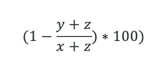
ChangePilot Change Health Score Examples
Organisation 1:
-
120 imminent items (items where 'Standard start' is in the next 30 days)
-
25 unmanaged imminent items (imminent items that have the status of 'New')
-
No missed items (items that closed and expired in the last 30 days)
-
Change Health Score = 79.2
Organisation 2:
This organisation is like Organisation 1, however they have missed items in the last 30 days:
-
120 imminent items (items where 'Standard start' is in the next 30 days)
-
25 unmanaged imminent items (imminent items that have the status of 'New')
-
10 missed items (items that closed and expired in the last 30 days)
-
Change Health Score = 73.1
Organisation 3:
This organisation has a service category that isn't configured for automatic item assignment. This means essential items aren't being assigned unless manually assigned after receipt and review.
They another service category where the team are processing a good proportion of their items.
Service Category 1:
-
50 imminent items (items where 'Standard start' is in the next 30 days)
-
None of these items have been managed - 50 unmanaged imminent items (imminent items that have the status of 'New')
-
20 missed items (items that closed and expired in the last 30 days)
-
Change Health Score = 0
Service Category 2:
-
90 imminent items (items where 'Standard start' is in the next 30 days)
-
15 unmanaged imminent items (imminent items that have the status of 'New')
-
5 missed items (items that closed and expired in the last 30 days)
-
Change Health Score = 78.9
Organisation 3 Overall:
-
140 imminent items (items where 'Standard start' is in the next 30 days)
-
65 unmanaged imminent items (imminent items that have the status of 'New')
-
25 missed items (items that closed and expired in the last 30 days)
-
Change Health Score = 45.5