
See this article for general instructions for importing ChangePilot flow templates.
Often it is necessary to inform non-ChangePilot users of a Message Center item. These colleagues may be responsible for user comms and need to understand upcoming user-impacting changes only, or, a centralised IT team may need to inform other business units who don't have access to the Message Center or ChangePilot of features and updates.
This flow enables the posting of a Teams channel post including data from ChangePilot about a Message Center item, triggered by the application of a tag.
For more information on creating custom tags, see this article.
Flow template file
The flow template file can be dowloaded here.
Flow information
- Title: Send message to another business unit
- Description: When a specified tag is applied to a Message Center item in ChangePilot, a message is sent to a Teams channel as a new post. This channel does not have to be in the ChangePilot Team.
- New Connection/s Used: Microsoft Teams
Configuring the flow post-import
- Teams Connection - configure the Teams CR (connection reference) during solution import.
- Flow Condition - add the desired tag value as the flow condition:
- Hover over the expression and review the tag value. In the example below, the value is 121570019.
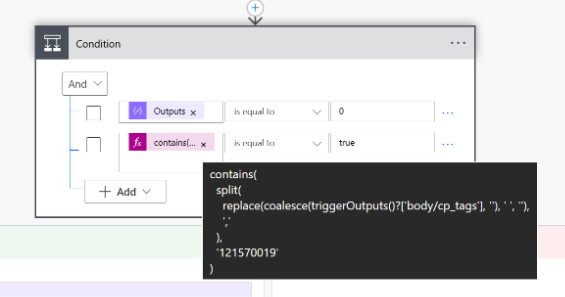
- Find the numerical value from the 'Tag Options' 'Choice' item in the ChangePilot Solution.
For more information on creating custom tags, see this article. - Click on the expression and copy out all the contents of the expression. Update with your value, then click 'Update'.
contains(split(replace(coalesce(triggerOutputs()?['body/cp_tags'], ''), ' ', ''),','),'121570019')
- Hover over the expression and review the tag value. In the example below, the value is 121570019.
- Flow Teams Actions - edit Team/channel/recipient/message values as required.
- Remember to save your flow after any changes!