
January 2026 Top Microsoft 365 Message Center & Roadmap Updates
These are the top 5 Microsoft 365 Message Centre and Roadmap items from the last month that our M365 change experts have hand-selected so you don't have to. At least pay attention, and where relevant, take action on these updates, new features and changes, to avoid service disruption, enhance productivity and uphold security and compliance policies in your organisation.
Top 5 Microsoft 365 Message Center Items in January 2026
Organisations monitoring the Microsoft 365 Message Center and Roadmap this month gain insights into Teams client changes, AI-driven meeting enhancements, and compliance requirements for telephony, alongside new capabilities in Copilot experiences.
MC1189656 – Upcoming Change to Teams Desktop Client on Windows
Microsoft is introducing an update to the Teams desktop client for Windows to improve performance and security.
Capabilities include:
- Enhanced stability and reduced memory usage
- Improved sign-in experience for enterprise accounts
- Updated architecture for faster feature rollouts
Deployment details:
- Release Start: 10 Jan 2026
- Release End: 25 Jan 2026
- Admin Impact: Medium
- User Impact: Medium
Recommended actions:
- Notify users about the upcoming client update
- Validate compatibility with existing device configurations
- Update internal documentation for helpdesk support
MC1191612 – Interpreter Agent in Teams Calls
Teams calls now support real-time interpretation through the Interpreter Agent, improving accessibility for multilingual meetings.
Capabilities include:
- Real-time speech-to-speech interpretation in supported languages
- Voice simulation for natural conversation flow
- Seamless integration into Teams calls without additional apps
Deployment details:
- Release Start: 15 Jan 2026
- Release End: 30 Jan 2026
- Admin Impact: Low
- User Impact: Medium
Recommended actions:
- Communicate availability to global teams
- Review interpretation settings in Teams admin centre
- Update meeting policies to include interpretation options
MC1191607 – Know Your Customer (KYC) Required for Teams Phone Porting Requests
Microsoft is introducing KYC verification for Teams Phone number porting to strengthen compliance and security.
Capabilities include:
- Mandatory identity verification for porting requests
- Secure submission process for required documentation
- Enhanced fraud prevention measures for telephony services
Deployment details:
- Release Start: 12 Jan 2026
- Release End: 28 Jan 2026
- Admin Impact: High
- User Impact: Low
Recommended actions:
- Inform telephony administrators of new KYC requirements
- Prepare documentation for upcoming porting requests
- Update internal processes to align with compliance standards
MC1193290 – Anthropic Models Available by Default in Copilot Experiences
Microsoft Copilot now includes Anthropic AI models by default, expanding generative capabilities for Microsoft 365 users.
Capabilities include:
- Access to Anthropic models for enhanced reasoning and summarisation
- Improved contextual understanding in Copilot responses
- Broader AI model options without manual configuration
Deployment details:
- Release Start: 18 Jan 2026
- Release End: 31 Jan 2026
- Admin Impact: Low
- User Impact: Medium
Recommended actions:
- Communicate new AI capabilities to Copilot users
- Review organisational AI usage policies
- Monitor performance and feedback during rollout
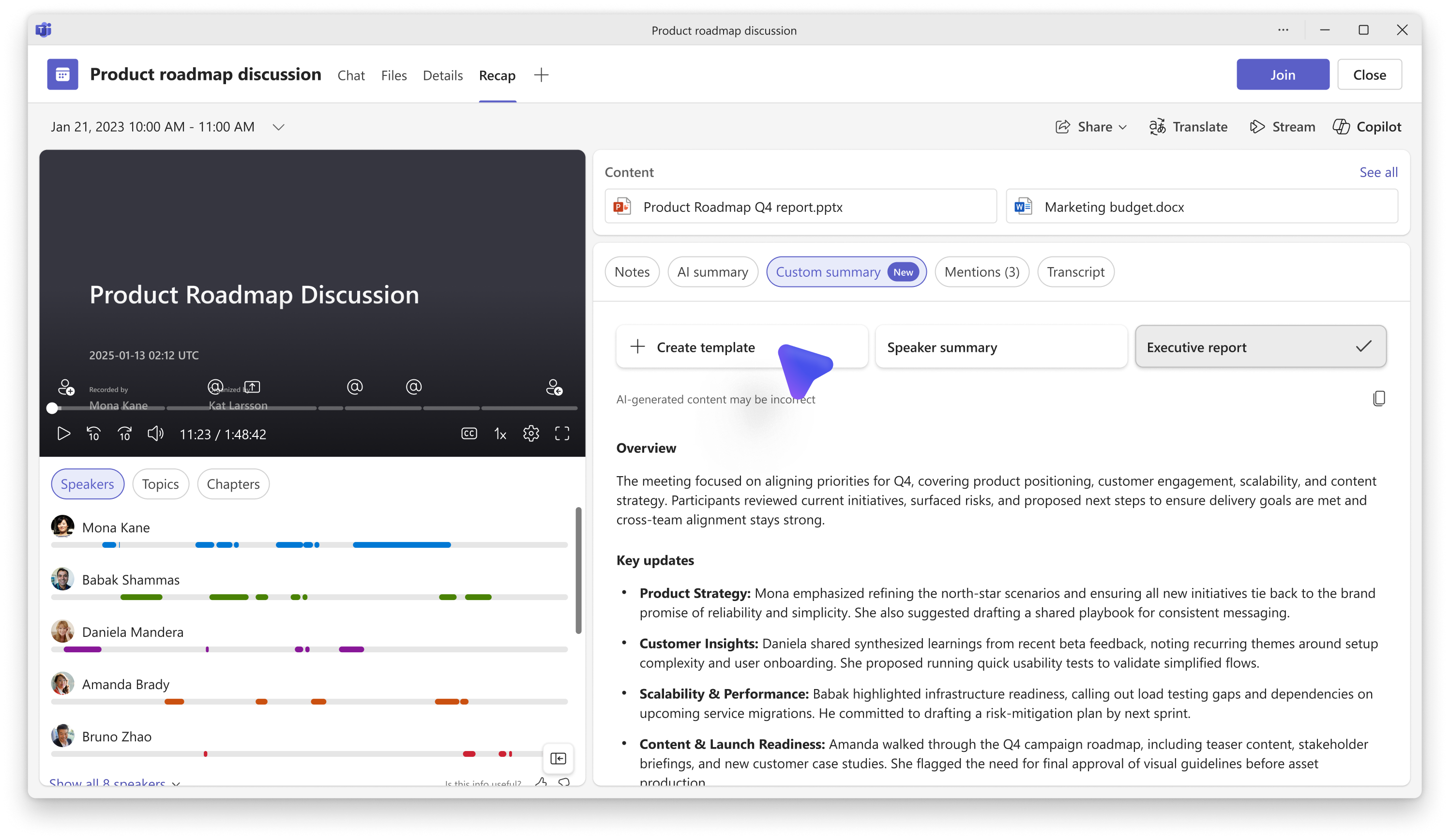
MC1189004 – Custom AI Summary Now Available in Meeting Recap
Teams meeting recap now includes custom AI summaries, allowing tailored content for post-meeting reviews.
Capabilities include:
- Generate personalised summaries based on meeting context
- Highlight key decisions and action items automatically
- Integrate summaries into Teams and Outlook for easy access
Deployment details:
- Release Start: 20 Jan 2026
- Release End: 31 Jan 2026
- Admin Impact: Low
- User Impact: Medium
Recommended actions:
- Inform users about new recap features
- Update training materials for meeting organisers
- Encourage adoption for improved meeting follow-up
Top 5 Microsoft 365 Roadmap Items in January 2025
531761 - Microsoft Defender for Office 365: Admins Can Hunt on Calls in Microsoft Teams
Capabilities include:
- Investigate Teams call activity directly from Defender portal
- Identify suspicious behaviour linked to Teams calls
- Integrate call data into broader threat hunting workflows
Rolling Out: Jan–Feb 2026
Platforms: Microsoft Defender Portal
Platforms: Microsoft Defender Portal
537269 - Express Voice Enrolment in Microsoft Teams
Capabilities include:
- Simplified voice enrolment process for Teams Phone
- Faster provisioning for new voice users
- Reduced administrative overhead for telephony setup
Rolling Out: Feb 2026
Platforms: Teams Admin Centre
Platforms: Teams Admin Centre
542189 - Microsoft Defender for Office 365: Admins Can Block External Users in Microsoft Teams from Defender Portal
Capabilities include:
- Block external Teams users directly from Defender portal
- Apply security policies without navigating Teams admin settings
- Improve response time for suspected account compromise
Rolling Out: Jan–Feb 2026
Platforms: Microsoft Defender Portal
Platforms: Microsoft Defender Portal
498640 - Microsoft Copilot (Microsoft 365): Capture Voice Notes in the Microsoft 365 Copilot Mobile App
Capabilities include:
- Record voice notes directly in Copilot mobile app
- Convert voice notes into actionable summaries
- Sync notes across Microsoft 365 apps for easy access
Rolling Out: Feb 2026
Platforms: Copilot Mobile App
Platforms: Copilot Mobile App
537279 - Microsoft Teams: Choose Your Enter Key Behaviour in Teams Chat
Capabilities include:
- Customise Enter key behaviour (send message or insert line break)
- Improve chat usability for different user preferences
- Reduce accidental message sends during drafting
Rolling Out: Jan–Feb 2026
Platforms: Teams Desktop and Mobile
Platforms: Teams Desktop and Mobile
Master Microsoft 365 Evergreen Change with ChangePilot
January’s updates highlight Microsoft’s continued focus on meeting flexibility, AI-driven productivity, and data protection.
Organisations should prioritise reviewing external collaboration settings, updating compliance policies for Copilot, and preparing users for new meeting and presentation tools.
The volume of updates in Microsoft 365 can make change management challenging. A structured approach helps IT teams prioritise actions, communicate changes effectively, and maintain compliance.
Key considerations:
- Review updates regularly and assess impact
- Align deployment timelines with organisational readiness
- Communicate significant changes to stakeholders
- Use dashboards or tracking tools for visibility
Taking a systematic approach ensures Microsoft 365’s continuous innovation supports organisational goals without creating unnecessary operational risk.
Sign-up to get the ChangePilot monthly bulletin, including the top Microsoft 365 Message Center and Roadmap items sent straight to your inbox for free.
Comments