
Microsoft Teams Work Location MC1081568 Update Delayed to March 2026
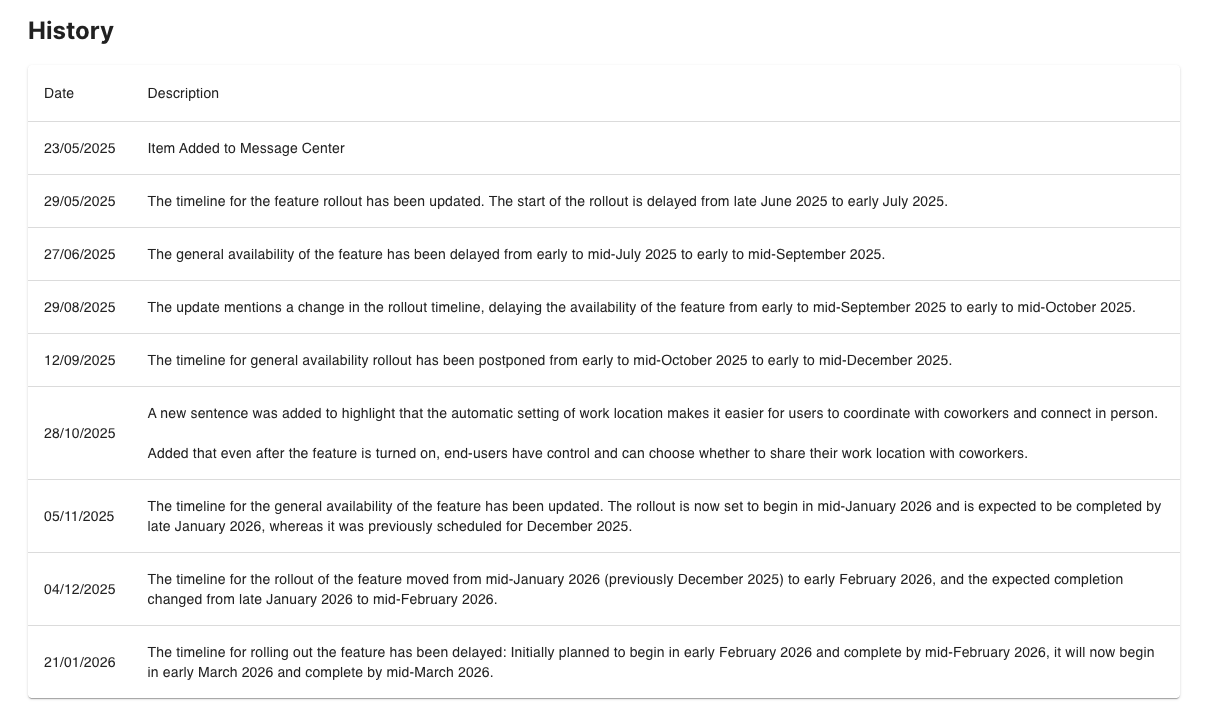
Staying ahead of Microsoft 365 evergreen change is never straightforward, and this update is a perfect reminder of why. Microsoft has delayed the rollout of the new Teams Work Location feature until March 2026, pushing back a capability many organisations were already preparing for.
At ChangePilot, our focus is helping organisations anticipate and adapt to change before it becomes disruption. Think of it as having a control tower for Microsoft 365: the radar, guidance, and coordination you need to navigate an always‑moving environment. This update is no exception.
Below, we break down what the delay means, the impact on your Teams user experience and governance planning, and the actions you should take now to stay prepared.
What is the Teams Work Location Feature?
Just like a flight delay, this shift affects everything around it not just the passengers, but the downstream logistics and without visibility, these delays can easily catch teams off guard.
Why the Delay Matters
- Hybrid work planning may need adjusting
- Internal communications and training timelines may shift
- Dependencies in HR, workplace analytics, and meeting workflows may require updated expectations
Teams Work Location Capabilities
When the feature does roll out, organisations can expect:
- User‑selectable Work Location status visible across Teams
- Improved meeting coordination through location‑aware scheduling
- Enhanced hybrid experience signals for managers and colleagues
- Greater consistency with Outlook and Microsoft 365 presence indicators
These capabilities support more intentional collaboration, but only when users understand how to apply them effectively.
Updated Deployment Details
- New Rollout Window: March 2026
- Applies to: Teams desktop & web
- Admin Impact: Medium (policy review + comms)
- User Impact: Medium (behaviour change + new visibility options)
As with many Microsoft 365 updates, this timeline may still evolve, reinforcing the importance of structured, ongoing monitoring.
You can track future changes directly via the ChangePilot Message Center item for this update: https://portal.changepilot.cloud/MC1081568
Recommended Actions
To stay ahead of this change:
- Update internal timelines for training, comms, and departmental readiness
- Review Teams and Microsoft 365 governance policies related to presence, availability, and status visibility
- Inform hybrid work and people‑experience teams about the new deployment date
- Monitor for further changes using your Message Center workflows (or via ChangePilot’s automated alerts)
- Review dependent workflows, including room booking logic, meeting scheduling guidance, and team charter documentation
- Prepare training and support materials, ready to publish once rollout begins
Why Staying on Top of Message Center Date Changes Matters
Just as we highlight in our monthly ChangePilot Bulletin, Microsoft 365 updates often move, sometimes by days, sometimes by months, and sometimes (as in this case) by years.
This volatility can create:
- Operational risk when teams don’t see date changes in time
- Confusion among stakeholders expecting features that don’t arrive
- Compliance or adoption gaps if training and guidance aren’t aligned with reality
When the schedule changes, you need the equivalent of an air‑traffic control room, not scattered announcements. That’s the role ChangePilot plays: it ensures date shifts, risk levels, and cross‑team impacts never slip through the cracks.
Master Microsoft 365 Evergreen Change with ChangePilot
This delay highlights a broader challenge: Microsoft 365 is now a continuously evolving platform, and organisations must evolve with it. A structured approach to change management ensures you always:
- Review updates regularly and assess organisational impact
- Align rollout timing with genuine business readiness
- Communicate clearly with users, stakeholders, and leadership
- Maintain visibility across every change using dashboards or automated tracking tools
Whether an update lands early, late, or is delayed like a long‑haul flight, you always need to know what’s changing and what to do next.
Subscribe to the ChangePilot Monthly Bulletin for curated insights on Microsoft 365 Message Center and Roadmap updates delivered straight to your inbox, or get a demo of ChangePilot by contacting us.
Comments