
Microsoft 365 November 2026 Updates: Copilot UBB, Code and Teams
Last month Microsoft announced the new Copilot billing model. This month it goes live: usage-based billing (UBB) models arrive in Chat, Word, Excel and PowerPoint, and Copilot Code begins rolling out to Frontier, both gated by spending policies. Alongside them, Entra will let ordinary users create agent blueprints by default, Targeted release is being retired in favour of Frontier, Standard and Deferred release, and Teams devices on older app versions are losing calendar features as EWS is switched off. The common thread is simple: defaults are changing, and if you don't make a decision, Microsoft's default will apply.
Worth remembering: the items below are a hand-picked shortlist. Microsoft 365 changes every week, and most of those changes never make it into a monthly roundup.
That's exactly what ChangePilot is built for. ChangePilot monitors the full breadth of Microsoft 365 change, including Message Center items, Roadmap updates and more, so nothing slips through the cracks. This blog is a taster. ChangePilot is the full picture.
Create a free ChangePilot account to explore Microsoft 365 Message Center, Roadmap and Azure updates, with plain-English summaries and impact ratings.
Top Microsoft 365 Message Center Items - November 2026
Five items made the cut this cycle. Two take October's Copilot billing announcement from policy to product, one changes who can create AI agents in your tenant, and two come with deadlines: one for release preferences and one for Teams devices that is already in effect.
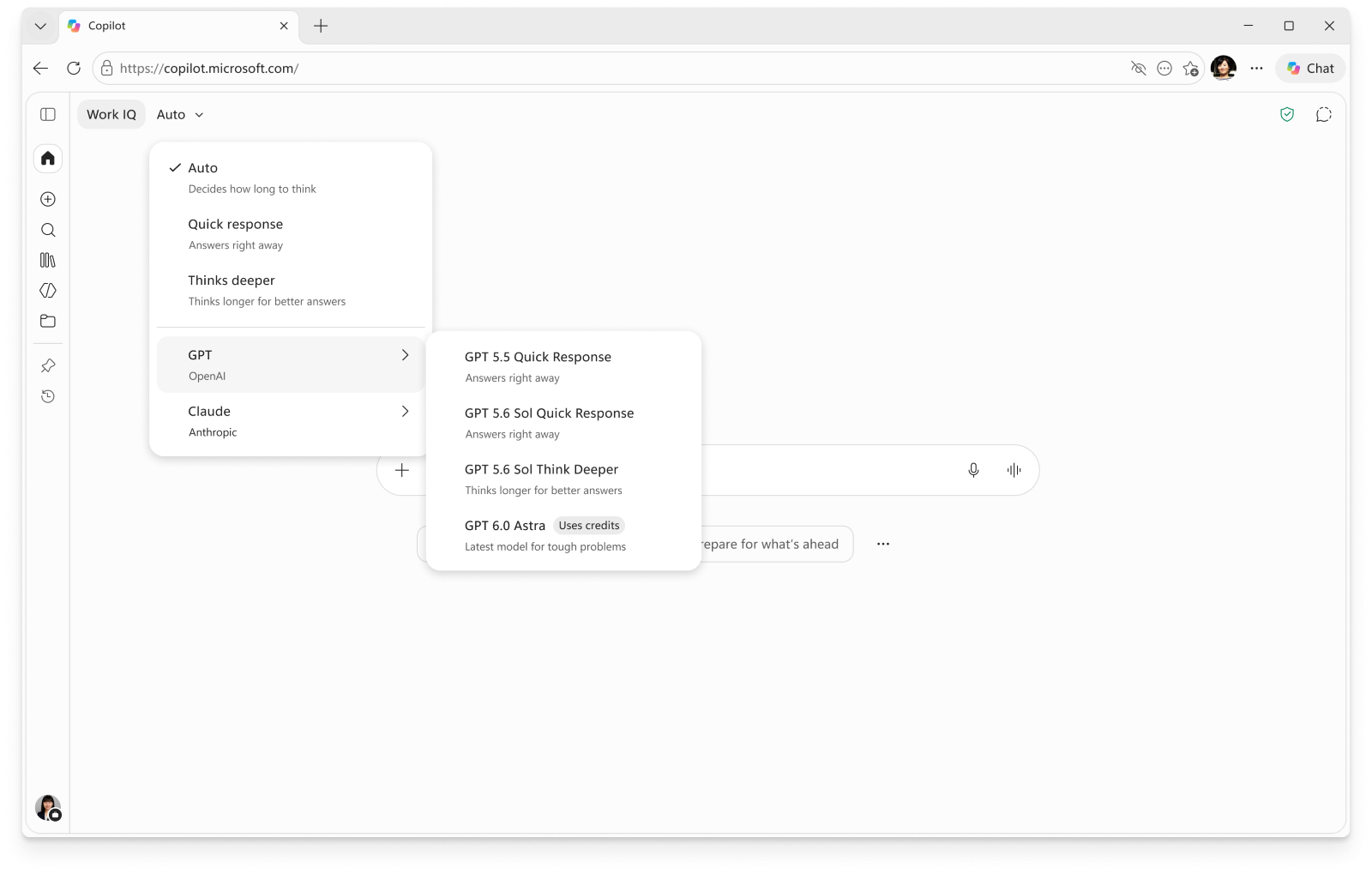
MC1519122 – Microsoft Copilot: UBB Models in Chat and Word, Excel, and PowerPoint via the Model Selector
Usage-based billing models, including GPT-6 Astra and Claude Fable 5.1, are coming to the model selector in Copilot Chat and Copilot in Word, Excel and PowerPoint from early November. Users only see them if an admin has enabled UBB and allocated credits.
Why it matters: this is the first big user-facing result of the pricing change in MC1479276. Your spending policy decisions now control which models people can pick inside the apps they use every day.
What's changing:
- UBB models appear in the Chat model selector in the Copilot app and in Copilot in Word, Excel and PowerPoint
- Access requires a Microsoft 365 Copilot user subscription licence (USL), UBB enabled for the user, and allocated credits
- A later update will let users request additional credits from their tenant admin
Deployment details:
- General availability (Worldwide): rolling out from early November 2026, expected to complete by mid-November 2026
Recommended actions:
- Confirm which users hold a Microsoft 365 Copilot licence and should have access to advanced models
- Enable UBB and allocate credits only after reviewing governance requirements and expected consumption
- Publish an internal process for requesting more credits before the in-product request feature arrives
For the full USL vs. UBB breakdown, see our deep-dive: Copilot Credits & Usage-Based Billing MC1479276: What Admins Must Do.
MC1519871 – Copilot Code Is Rolling Out in Frontier
Copilot Code lets users turn ideas into trackers, dashboards and apps using natural language, grounded in Work IQ, and publish them to Copilot Managed Runtime. It starts with the Frontier programme from late October and needs a Copilot licence plus a spending policy.
What's changing:
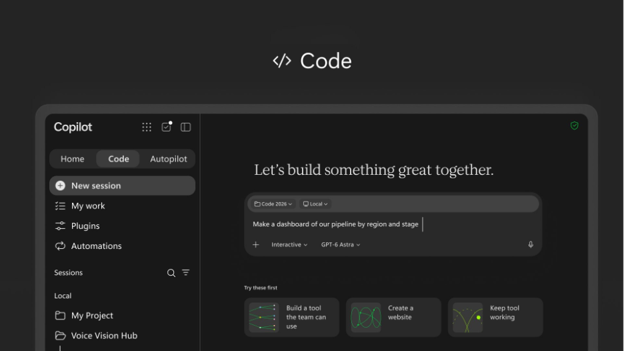
- A new Code destination in the Copilot app navigation pane, available on Windows and the web
- Projects can be published to Copilot Managed Runtime and shared internally, with data access still governed by each user's permissions
- Cloud coding sessions are on by default for eligible users; local coding on PC is off unless an admin sets Code execution location to Cloud and local
- GitHub can be connected when an admin enables it
- Users whose spending policy has "Allow new Agents and services as they become available" switched on get Code automatically
Deployment details:
- Frontier: rolling out from late October 2026
Recommended actions:
- Check which spending policies have automatic access to new services enabled, as those users will receive Code without any further action
- Decide between cloud-only and cloud and local coding before enabling local execution
- Deploy the unified Microsoft Copilot app and, for Frontier Windows devices, set the Copilot target channel to Beta
- Brief the help desk on the new Code experience and your access-request process
MC1506733 – Review Who Can Create Agents in Microsoft Entra
From 4 November, default users in Microsoft Entra will be able to create new agent blueprints unless an admin turns off the new "Users can create agent blueprints" setting. Any preference you set now takes effect when the rollout begins.
What's changing:
- Users without built-in or custom Entra roles can create agent blueprints by default
- The new setting is independent of "Users can register applications"
- Supported administrators and users with the Agent ID Developer role can still create blueprints when the setting is restricted
- Existing blueprints, agent identity creation from existing blueprints, and creation requirements in Microsoft Foundry or Security Copilot are unchanged
Deployment details:
- Worldwide: rolling out from early November 2026, expected to complete by late November 2026
Recommended actions:
- Decide your position before 4 November. To restrict creation, go to Microsoft Entra admin center → Entra ID → Users → User settings → Default user role permissions → Users can create agent blueprints → No
- Assign the Agent ID Developer role to the people who should keep building agents
- Align this decision with your Copilot Studio and Copilot Code governance so agent creation rules are consistent
MC1490899 – Targeted Release Retirement (Microsoft 365)
Targeted release is retiring in January 2027 as Microsoft 365 moves to three release options: Frontier, Standard release and Deferred release. Enrolment changes to Targeted release are disabled from November 2026.
What's changing:
- A unified release preferences experience replaces Targeted release in the Microsoft 365 admin center
- Admins can no longer add, remove or modify Targeted release enrolments from November 2026
- Targeted release stops being used for Microsoft 365 feature delivery in January 2027
Deployment details:
- November 2026: Targeted release enrolment changes disabled; unified release preferences experience available
- January 2027: Targeted release retires
Recommended actions:
- Identify users currently on Targeted release under Settings → Org settings → Organization profile → Release preferences
- Move them to Frontier, Standard release or Deferred release based on their role, and review Copilot release preferences under Copilot → Settings
- Remember that Frontier is now the path to early Copilot features such as Code, so treat enrolment as a governance decision
- Let change management, support, security and compliance teams know about the new model
MC1486288 – Update Teams Devices to a Minimum App Version Ahead of EWS Retirement
EWS is being switched off in Exchange Online from October 2026. Teams Rooms on Android, Teams phones and Teams panels running app versions older than February 2026's minimum release may lose calendar features.
What's changing:
- Teams Rooms on Android may stop syncing the room calendar, and one-touch join may not be available
- Teams phones may not list scheduled meetings (calling is not affected)
- Teams panels may not show room availability, and room reservations may fail
Deployment details:
- EWS disablement: rolling out from early October 2026, expected to complete by late April 2027
- Minimum versions: Teams Rooms on Android 1449/1.0.96.2025421910; Teams phones 1449/1.0.94.2025460012; Teams panels 1449/1.0.97.2025385601
Recommended actions:
- Check device app versions in the Teams admin center or Pro Management Portal now, as the rollout has already started
- Update any device below the minimum version, ideally to the latest release
- Warn facilities and meeting-room support teams about the symptoms so issues are routed quickly
Top Microsoft 365 Roadmap Items Rolling Out in November 2026
Where this month's Message Center items focus on billing, agent creation and release controls, November's Roadmap items bring that governance into Teams meetings and calls: who can use AI in a meeting, who is really in the meeting, and whether people have agreed to be recorded.
577399 – Microsoft Teams: Enhanced Copilot and AI Controls for Meetings
Teams meetings are getting enhanced controls for Copilot and other AI experiences. Organisers will manage who can enable and access AI in their meetings, while IT admins get a simpler policy model for governing AI across meetings and post-meeting experiences.
Rolling out:
- November 2026 (Desktop, Mac - Worldwide standard multi-tenant)
Recommended actions:
- Review your current Teams meeting policies for Copilot, transcription and recap so you can map them onto the simpler policy model
- Agree on defaults for sensitive meeting types, such as HR, legal and board meetings, before organisers start making their own choices
- Update organiser guidance to explain the new controls over who can enable and access AI
573157 – Microsoft Teams: Impersonation Protection for Teams Meetings
Teams will warn users when it detects a possible impersonation attempt by a meeting participant or organiser, showing risk indicators so people can make informed decisions before joining or while taking part.
Rolling out:
- November 2026 (Desktop, Mac, Web, iOS, Android - Worldwide standard multi-tenant)
Recommended actions:
- Tell users what the new warnings look like and what to do when they see one
- Brief security and help desk teams so suspicious meeting reports are handled through your existing phishing process
- Include meeting impersonation in your next security awareness update, especially for finance and executive assistants
571400 – Microsoft Copilot: Chat Access to UBB Models via the Model Selector
This is the Roadmap entry behind MC1519122 above. Users will be able to select usage-based billing (UBB) models from the model selector in Chat once tenant admins have allocated credits. When users run out of credits, they will be able to request more from their admins.
Rolling out:
- General availability listed for October 2026 (Desktop, Web - Worldwide standard multi-tenant); MC1519122 confirms rollout from early November to mid-November 2026
Recommended actions:
- Treat this alongside MC1519122 and MC1479276 as one piece of Copilot billing work, not three separate changes
- Decide who reviews and approves credit requests before the request option reaches users
- Set expectations with users about which models need credits and how to ask for more
576711 – Microsoft Teams: AI Interpreter for Teams Events
AI Interpreter brings real-time, AI-powered audio interpretation to Teams town halls and webinars. Organisers can choose the supported languages for their event, so attendees can listen in their preferred language rather than relying only on translated captions.
Rolling out:
- November 2026 (Desktop, Mac, Web, iOS, Android - Worldwide standard multi-tenant)
Recommended actions:
- Let internal communications and events teams know ahead of any global town halls planned for late 2026
- Check licensing and policy requirements for town halls and webinars before promising the feature to event organisers
- Test interpretation quality for your key languages before using it for high-profile events
577543 – Microsoft Teams: Explicit Consent for Recording & Transcription in One-to-One PSTN Calls
Teams is extending its explicit consent calling policy to one-to-one PSTN calls. When recording or transcription starts, PSTN participants hear an audio prompt and use their keypad to agree or decline. Participants who decline can stay on the call but remain muted.
Rolling out:
- Targeted for December 2026 (iOS, Android - Worldwide standard multi-tenant)
Recommended actions:
- Check whether your Teams calling policies already require explicit consent, as this extends the existing policy to one-to-one PSTN calls
- Brief legal and compliance teams, particularly in regulated or customer-facing roles where calls are recorded
- Update call-handling guidance so staff know what external callers will hear and what happens if they decline
Frequently Asked Questions
What is changing with Copilot usage-based billing in November 2026?
From early November 2026, usage-based billing (UBB) models are rolling out in Copilot Chat and Copilot in Word, Excel and PowerPoint. To access them, users need a Microsoft 365 Copilot licence, UBB enabled and Copilot Credits allocated by an admin. Admins should review spending policies, decide who gets access and set credit limits before enabling these models.
Will users automatically see GPT-6 Astra and Claude Fable 5.1 in Word, Excel and PowerPoint?
No. UBB models only appear for users with a Microsoft 365 Copilot licence who have UBB enabled and credits allocated. Without those, nothing changes in the model selector.
Could some users get Copilot Code without us explicitly turning it on?
Yes, if they're in Frontier and covered by a spending policy with "Allow new Agents and services as they become available" enabled. Review those policies to see who will automatically receive Code.
Does the Entra agent blueprint setting affect existing agents?
No. Existing blueprints and the creation of agent identities from them are unaffected. The setting only controls whether default users can create new blueprints from 4 November.
What happens to users still on Targeted release after January 2027?
Targeted release will no longer be used for feature delivery. Move users to Frontier, Standard release or Deferred release now, as you won't be able to change Targeted release enrolments from November 2026.
Will Teams phones stop making calls after EWS retirement?
No. Calling isn't affected. On out-of-date app versions, phones may stop listing scheduled meetings, and Rooms and panels may lose calendar sync and room booking.
Stay on Top of Microsoft 365 Change With ChangePilot
November is the month AI governance gets real. October announced the new rules for Copilot billing; now UBB models and Copilot Code reach users, Entra opens agent creation to everyone by default, and Frontier becomes the main route to early access as Targeted release is retired. Each of these is a default you either accept or change, so spending policies, agent creation rights and release preferences belong on the same admin checklist. Meanwhile, the EWS retirement is a reminder that some deadlines have already passed for out-of-date Teams devices.
The Roadmap applies the same thinking to Teams, with simpler AI controls for meetings, impersonation warnings, real-time AI interpretation for events, and explicit recording consent for PSTN callers. AI is becoming more useful in meetings, and admins are getting more control over how it is used.
To see every Message Center, Roadmap and Azure update in plain English, with impact ratings, create a free ChangePilot account.
Comments