
What is Microsoft Scout? The First Always-On Agent for Microsoft 365
Microsoft published Message Center post, MC1332811 announcing the launch of Microsoft Scout, its first always-on Autopilot agent, available now in Frontier preview for enrolled customers on Windows and macOS. Scout is OFF by default and requires specific admin actions before any user can access it. If your team hasn't reviewed this yet, your governance and Intune policies may not be ready.
Summary
- Microsoft is introducing a new category of agent called Autopilots
- Microsoft Scout is the first Autopilot: it runs in the background across Teams, Outlook, OneDrive, and SharePoint, acting on behalf of users within your security and governance guardrails
- Available now in Frontier (preview) on Windows and macOS; general availability date not yet confirmed
- Feature is OFF by default - users cannot sign in until admins complete required setup steps
- Admin prerequisites: Intune device/access policy configuration, admin opt-in and attestation, and GitHub Copilot licensing for AI credit billing
- Scout involves data flows outside Microsoft 365 (GitHub-based inference) — admin attestation is required due to this
- Action required: Review compliance implications with security stakeholders, configure Intune policies, and brief helpdesk teams before enabling
- MC reference: MC1332811
What is Microsoft Scout?
Microsoft has just announced Microsoft Scout - its first Autopilot agent, and arguably one of the most significant shifts in how AI will operate inside Microsoft 365 environments.
Unlike Copilot, which responds when you ask it something, Scout is always on. It runs autonomously in the background, monitors your priorities, and takes action on your behalf across Teams, Outlook, OneDrive, and SharePoint, without you needing to prompt it.
This isn't a small update; this is a new category of AI.
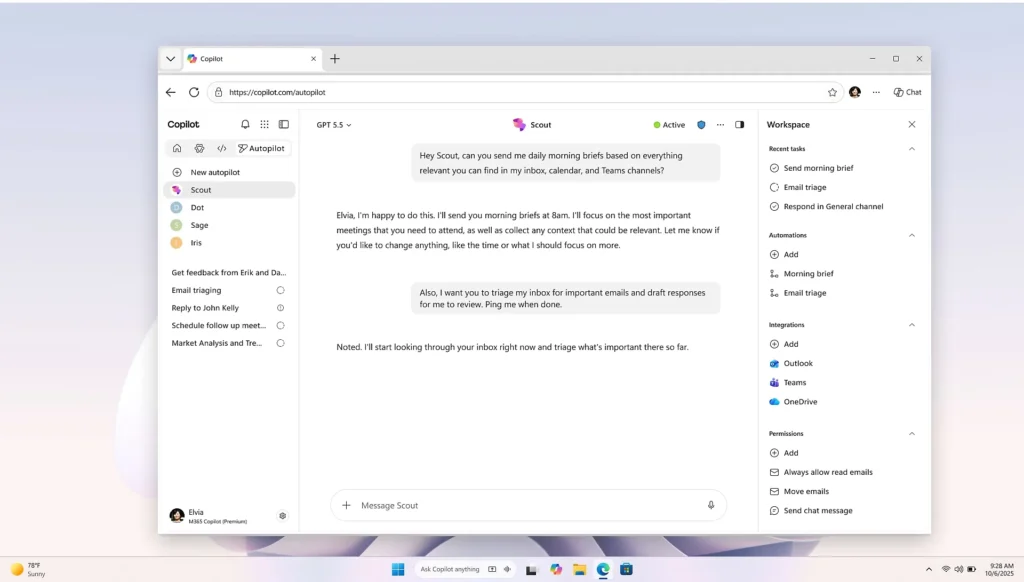
Source: Microsoft
What Makes Microsoft Scout Different
Most AI tools in Microsoft 365 are reactive - you ask, they respond.
Microsoft Scout introduces a fundamentally different model:
- Always-on: Scout runs continuously in the background
- Autonomous identity: It has its own identity and acts on your behalf
- Cross-app reach: It spans Teams, Outlook, OneDrive, and SharePoint
- Local execution: The Scout app runs locally on the user's device (Windows and macOS)
- Built on OpenClaw: Microsoft's open-source agentic framework underpins it
Microsoft calls this new category Autopilots - agents that don't wait to be asked.
What Admins Need to Know About Microsoft Scout Right Now
It's Off-by-Default, But You Still Need to Act
Scout is available now through Microsoft's Frontier (preview) programme. It is OFF by default and cannot be used until admins take specific steps.
Here's what's required before any user can sign in:
- Configure Intune policies — device and access policies must be set up in Microsoft Intune
- Complete admin opt-in and attestation — required because Scout involves data flows outside Microsoft 365 (including GitHub-based inference)
- Ensure GitHub Copilot licensing — AI credit billing runs through GitHub Copilot, so eligible users must have appropriate licenses
If prerequisites aren't met, users will hit sign-in failures. Prepare your helpdesk teams before any rollout.
Compliance and Data Considerations
This is where admin scrutiny is most important:
| Question | Answer |
|---|---|
| Does Microsoft Scout store new customer data? | Yes — data paths exist outside Microsoft 365 (e.g. GitHub-based inference), requiring explicit admin attestation |
| Does Microsoft Scout introduce AI/agent capabilities over customer data? | Yes — Scout can act proactively on behalf of users within organisational guardrails |
| Third-party integrations? | Yes — GitHub Copilot is required for AI credit billing |
| What admin controls are available for managing Microsoft Scout? | Microsoft Scout is gated through Intune, Frontier enrollment, and admin opt-in/attestation |
| Can users enable/disable Microsoft Scout? | Users can install the app, but cannot use it without admin enablement |
Bottom line: Before enabling Scout for any users, you should review the data and compliance implications with your security and compliance stakeholders.
Microsoft Scout Rollout Timeline
- Frontier (Preview): Available now for enrolled customers on Windows and macOS
- General Availability: No date confirmed yet — Microsoft will communicate broader rollout timing separately
This is early days, but given the admin impact rating is High, and the feature involves data flows outside Microsoft 365, early awareness is critical.
What Should You Do Now?
If you're enrolled in Frontier:
- Review the Microsoft Scout documentation on Microsoft Learn
- Evaluate whether your Intune and identity policies are ready
- Engage security and compliance stakeholders before enabling
- Brief your helpdesk on sign-in prerequisites to pre-empt support tickets
If you're not enrolled in Frontier:
- Watch this space — GA is coming
- Start thinking about your governance posture: how do you want to handle always-on agentic AI in your environment?
- Review GitHub Copilot licensing requirements for your user base
The Bigger Picture
Microsoft Scout isn't just a new feature; it's the first signal of where Microsoft is taking AI in the enterprise. Autopilots represent a shift from AI as a tool you use, to AI as an actor that works for you, continuously.
For IT admins, that shift brings both opportunity and responsibility. The governance frameworks you put in place now around identity, data flows, and agentic AI policies will matter far more as this category matures.
Key Links
- Introducing Microsoft Scout | Microsoft 365 Blog
- Microsoft Scout (Frontier) documentation | Microsoft Learn
- Download Microsoft Scout
- Set up Microsoft Intune
- GitHub Copilot licensing
Want to stay on top of changes like this automatically? ChangePilot monitors the Microsoft 365 Message Center and Roadmap so your team never misses a high-impact update.
Comments