
Top 10 Microsoft 365 Message Center & Roadmap Items in February 2026
These are the top Microsoft 365 Message Center and Roadmap updates our M365 change specialists have hand‑selected this month so you don’t have to. Staying ahead of these new features, service changes, and AI‑driven enhancements is essential to avoid disruption, strengthen governance, and support a secure and productive digital workplace.
Top 5 Microsoft 365 Message Center Items in February 2026
MC1218712 - Meeting Notes Now Available for Instant Meetings
- Automatic creation of meeting notes for ad‑hoc/instant meeting
- Centralised notes stored alongside the meeting
- Collaborative editing for all participants
- Notes accessible after the meeting for review and follow‑up
- Rollout begins February 2026 and completes by early March 2026
- Applies to Teams for desktop and web
- Inform users that instant meetings will now have notes by default
- Update internal training content and meeting etiquette guidance
- Encourage teams to review notes after each instant meeting
- Review retention and governance policies related to meeting artifacts
.png?width=720&height=409&name=MC1218712%20(1).png)
MC1216032 - Action Required: Teams Application Update Required for Explicit Recording Consent on Teams Phone Devices
- Display of consent prompts on Teams Phone Devices
- Enforcement of user consent before recording starts
- Improved compliance with recording policies
- Admin controls for managing consent behaviour
- App update required before enforcement begins (Microsoft deadline indicated in message)
- Applies specifically to Teams Phone Devices only
- Mandatory after the enforcement date
- Update all Teams Phone Devices to the latest Teams app version
- Communicate the consent workflow to frontline and phone‑based staff
- Validate that auto‑update policies are correctly configured
- Review compliance requirements tied to recording and consent
MC1216259 - Introducing New Paid Extended Service Team (EST)
- Additional paid coverage beyond standard end‑of‑support dates
- Extended security updates and technical assistance
- Option to maintain legacy workloads for longer
- Predictable planning for delayed migrations
- EST available for eligible products nearing end‑of‑support
- Purchased as an add‑on via commercial channels
- Identify systems in your environment approaching retirement
- Evaluate whether EST is required or whether accelerated migration is preferable
- Budget for extended coverage if needed
- Review Microsoft lifecycle documentation for affected products
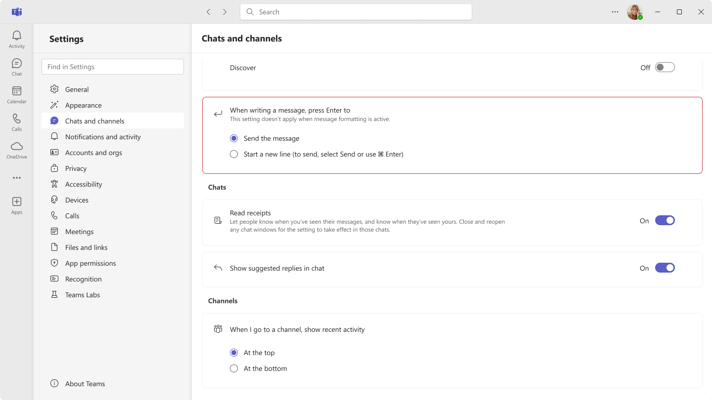
MC1217643 - Choose your "Enter" key behaviour in Teams Chat Settings
Users can now choose whether the Enter key sends a message or inserts a new line within Teams chat.
- User-selectable “Send message” or “Insert new line” option
- Per‑user configurable in Chat Settings
- Clearer messaging behaviour and reduced accidental sends
- Release Start: 18 Jan 2026
- Release End: 31 Jan 2026
- Admin Impact: Low
- User Impact: Medium
- Notify users of the new personalisation option
- Update onboarding materials and training guides
MC1213773 - Action Required: Teams Direct Routing Change
Microsoft is implementing a change to Teams Direct Routing that requires customer action to avoid disruption to PSTN calling.
- Improved reliability and routing resilience
- Updated SIP configuration requirements
- Better alignment with Teams calling architecture
- Take action by end of February 2026
- Applies to all organisations using Teams Direct Routing
- Review Microsoft’s updated Direct Routing guidance
- Validate SBC configurations against required changes
- Perform testing in non‑production environments where possible
- Coordinate with telephony vendors or partners to ensure compliance
Top 5 Microsoft 365 Roadmap Items in January 2025
547825 - Queues App Historical Reporting Supports 45 Days of Data
-
View up to 45 days of call queue, auto attendant, and agent historical data
-
Expanded reporting window beyond the default 7‑day range
Platforms: Desktop, Mac
-
Select from multiple AI models when using Agent Mode in Word
-
Flexibility to choose the best model per writing task
Platforms: Web
551195 - Enhanced M365 Copilot Memory
-
Copilot now uses Microsoft Graph data to improve contextual and relevant responses
-
Trigger actions such as join meeting, raise hand, launch pre‑join screen from any connected certified device
Platforms: Android, Desktop, iOS, Mac, Web
494149 - Teams Button on Certified Personal Peripheral Devices
- Use the Teams button seamlessly across multiple connected peripherals (e.g., headsets, speakerphones) without switching device settings manually
- Convert voice notes into actionable summaries
- Sync notes across Microsoft 365 apps for easy access
Platforms: iOS
548647 – Digital signage in Teams Rooms on Android
- Display dynamic signage (news, events, guides) on front-of-room displays when rooms are idle
- Tenant-wide or room-specific configuration via Teams Rooms Pro Management Portal
Platforms: Android
Master Microsoft 365 Evergreen Change with ChangePilot
A structured approach to Microsoft 365 change management helps IT teams reduce risk, streamline communication, and maintain visibility across continuous updates.
Key considerations:
-
Review updates regularly and assess organisational impact
-
Align rollout timing with business readiness
-
Communicate major changes to stakeholders
-
Use dashboards or tracking tools for ongoing visibility
Taking a proactive, consistent approach ensures Microsoft 365 innovation drives productivity and stability without increasing operational risk.
Subscribe to the ChangePilot monthly bulletin for curated Microsoft 365 Message Center and Roadmap insights delivered straight to your inbox.
Comments